
Latest Post


Hipster Lightroom Presets Pro

Hipster
Lightroom Presets are perfect for photographers, graphic designers and
fashion bloggers. There presets are professionally designed to give your
images a magic and remarkable tone, enabling you to streamline your
editing process and enhance your images. Professional photographers and
retouchers choose our products, because it's powerful, creative and easy
to use. Included 35 Hipster Lightroom Presets.
Download
Best B&W Wedding Lightroom Presets

Best B&W Wedding Lightroom Presets 367158
Black
and White Wedding Lightroom Presets Professional Collection by BeArt
Presets includes 30 Premium Lightroom Presets for professional
photographers. Black and white photos are considered more emotional than
the usual, that's because they convey emotion and feeling much better.
Good black and white photo should express the story that is happening
behind. Now, in order to create a wonderful black and white picture, you
do not necessarily need to spend hours and hour on post-processing.
Just take your picture as usual and then use the BeArt Black and White
Wedding Collection. It’s a simple way to convert your shots to stunning
black and white images in just one click.
lrTemplate | CS3 | 300 DPI | 322.19 KB
30 Premium Lightroom Presets
Compatible with Lightroom 4, Lightroom 5, Lightroom 6 (CC2015)
Compatible with both a Mac and PC
Work on RAW and JPEG images
Can be easily adjusted to fit your image
Installation Instructions are included
========================================================
You
are allowed to sell photographs and artworks that have been improved by
the BeArt Presets. But you are not allowed to sell, distribute, bundle,
rent, give, remake, sub-license or otherwise transfer BeArt Lightroom
Presets or the right to use our Lightroom presets set to anyone else.

ParticleShop Powered by Painter

ParticleShop Powered by Painter 352638
Experience living grab-and-go Particle
brushes that are easy to use with a pressure sensitive tablet,
touchscreen or mouse and allow you to artistically enhance photos,
designs and illustrations with strokes of genius.
Explore an array of 11 included starter
pack brushes including debris, fabric, fine art, fur, hair, light,
smoke, space, storm and superhero that will produce awe-inspiring
results in no time. No experience, customization or time-consuming
learning is required. See the ParticleShop 11 included brushes in action
16 Ever Wanted Lightroom Presets

16 Ever Wanted Lightroom Presets
16 .lrtemplate Files | 6 MB
A great new preset to give your digital photos some of that old instant film nostalgia.
2 --- Old Gloomy Film
3 --- HDR Grand Hotel
4 --- Green Greens
5 --- Vintage Frame
6 --- Time Faded
Ever wanted to make your photos look like they’re from a vintage photo album that’s been sitting in the sun? This is the perfect preset for you
7 --- Warm Retro
8 --- B&W Berkeley
9 --- The Old Road
Add a vintage touch to your landscape photographs with this great Lightroom 5 Preset
10 --- Rosé
11 --- Grey Gray
12 --- Gypsy Soul
13 --- One Click HDR
14 --- Cinematic One
The perfect Lightroom preset for a filmic look to all your images
15 --- Carnival Glow
16 --- B&W Nights
Root Cleaner v4.1.2 Apk

Requires Android:2.1 and up
UNIQUE ROOT APPLICATION AND ALSO GREAT FOR USING WITH RAM MANAGER!
Root Cleaner
What’s in this version :- Fixed minor issue
App Review:
PLEASE, IF YOU HAVE SOME PROBLEM, CONTACT ME BEFORE YOU GIVE LOW RATING AND I WILL TRY TO HELP YOU AND SOLVE YOUR PROBLEM.
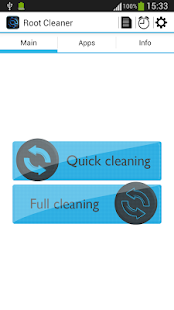
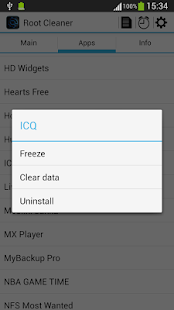
Simple and effective application which a
lot increases your peformance by cleaning your system. You can choose
between quick cleaning and full cleaning. Quick cleaning clears your
memory, file cache, etc. and you can do that without reboot. Full
cleaning requires reboot, but it makes really total maintenance of your
system. Full cleaning is also great when you want to flash other ROM or
kernel, so it will clean your device to prevent any problem. Application
is also great application manager, you can uninstall, clear data and
freeze or unfreeze your system and non-system applications.
FEATURES:
- ★Quick cleaning
- -Clearing memory (Optional)
- -Clearing file cache
- -Restarting UI (Optional)
- -Deleting useless folders from SD card (Optional)
- ★Full cleaning
- -Wiping cache
- -Wiping dalvik cache
- -Battery calibration (Optional)
- -Deleting useless files from init.d folder
- -Fixing permissions
- -Deleting useless folders from SD card (Optional)
- ★App manager (system and non-system apps)
- -Uninstalling
- -Clearing data
- -Freezing
- -Unfreezing
Camera FV-5 v2.79 Apk

Camera FV-5 v2.79 Apk | 1.4 MB |
Requires Android:2.2 and up |
Camera FV-5 is a professional camera application for mobile devices, that puts DSLR-like manual controls in your fingertips.
Camera FV-5
What’s in this version:- Fixed: problems with the virtual shutter button in burst mode on some devices.
- Fixed: the app now correctly returns the picture to calling apps like Hangouts.
- Improved: the resolution indicator now supports displaying resolutions up to 32 megapixels.
- Fixed many other smaller issues.
App Review:
Tailored to enthusiast and professional
photographers, with this camera application you can capture the best raw
photographs so that you can post-process them later and get stunning
results. The only limit is your imagination and creativity!Major
features:
• All photographic parameters are adjustable and always at hand:
exposure compensation, ISO, light metering mode, focus mode, white
balance and program mode.
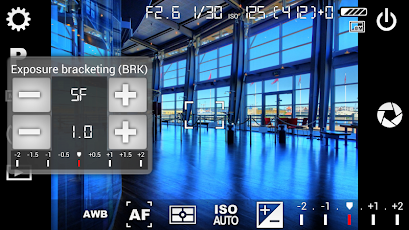
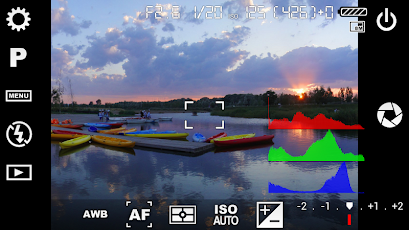
• DSLR-like viewfinder display: see exposure time, aperture and stops display with EV and bracketing settings.
• Full fledged exposure bracketing: from 3 to 7 frames, unlimited stops spacing, plus custom EV shifting.
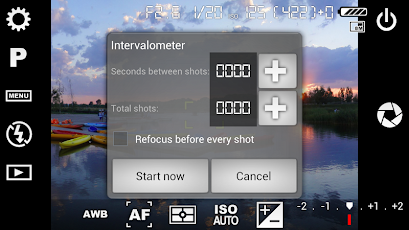
• Built-in intervalometer: make stunning timelapses (even bracketed/HDR timelapses) and time-controlled picture series.
• Program and Speed-priority modes.
• Long exposure support: take beautiful night photos and light trails with long exposure times up to 60 seconds*.
• JPEG as well as RAW (PNG**) image formats for lossless photo capturing, perfect for post-processing.
• EXIF and XMP sidecar metadata support.
• Self timer for delayed shooting.
• Autofocus, macro, touch-to-focus*** and infinity focus modes, plus a focus lock switch (AF-L).
• In background photo developing and processing allows a smooth, uninterrupted camera operation.This camera application completely avoids scene modes, instead you get full manual control over all photographic parameters, just like you do with a reflex camera, so you can ultimately control every aspect of the picture, and leave the post-processing to the computer. So after your DSLR, you will never miss a photo opportunity again, being able to capture it with the closer sensation to your DSLR as possible.
• DSLR-like viewfinder display: see exposure time, aperture and stops display with EV and bracketing settings.
• Full fledged exposure bracketing: from 3 to 7 frames, unlimited stops spacing, plus custom EV shifting.
• Built-in intervalometer: make stunning timelapses (even bracketed/HDR timelapses) and time-controlled picture series.
• Program and Speed-priority modes.
• Long exposure support: take beautiful night photos and light trails with long exposure times up to 60 seconds*.
• JPEG as well as RAW (PNG**) image formats for lossless photo capturing, perfect for post-processing.
• EXIF and XMP sidecar metadata support.
• Self timer for delayed shooting.
• Autofocus, macro, touch-to-focus*** and infinity focus modes, plus a focus lock switch (AF-L).
• In background photo developing and processing allows a smooth, uninterrupted camera operation.This camera application completely avoids scene modes, instead you get full manual control over all photographic parameters, just like you do with a reflex camera, so you can ultimately control every aspect of the picture, and leave the post-processing to the computer. So after your DSLR, you will never miss a photo opportunity again, being able to capture it with the closer sensation to your DSLR as possible.
AppMgr Pro III (App 2 SD) v3.68 Apk

AppMgr Pro III (App 2 SD) v3.68 Apk | 2 MB
| Requires Android:2.2 and up |
App 2 SD helps you to get more free internal phone storage space
AppMgr Pro III (App 2 SD)
What’s in this version :
- new “Root uninstaller” function that enables you to uninstall apps without confirmation for each app
- update FAQ for the new “Root uninstaller” function
- bugs fixed and optimizations
App Review:
Are you running out of application storage?
Do you hate having to check each and every app if it supports moving to the SD card?
Do you want an app that automatically does this for you and can notify you when an app can be moved?
App 2 SD streamlines the movement of
applications to on your device’s external or internal storage through
your device’s Settings. With this handy app, you’ll have more control
over your ever expanding collection of apps. This app is crucial to
anyone who has memory management issues.
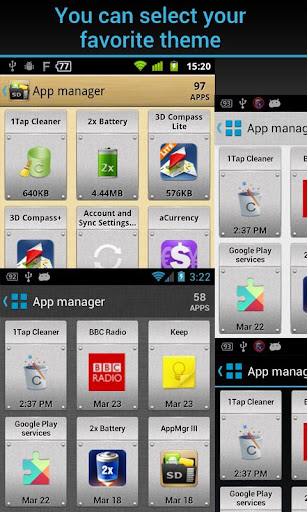
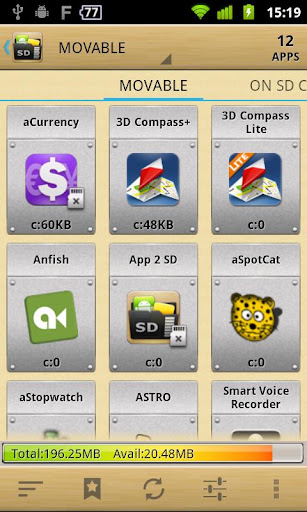
★ View all SD card capable apps and move them seamlessly
★ notify if movable apps installed
★ 1-tap to clear all app cache
★ export the app list to SD card
★ install apps from the exported app list
★ home screen widget shows cache and available size
★ show app cache/data/code/total size
★ keep track of total and available storage space
★ sort through apps stored on phone and SD card
★ add movable apps to the ignore list
★ move apps back to the internal storage
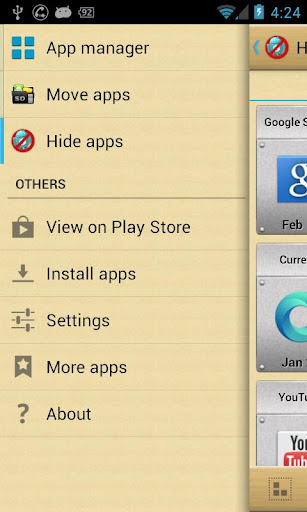
★ view app on Market
★ quick uninstall apps by drag-n-drop
★ open app
★ show app details page
★ support “Move2SD Enabler”
★ customizable notification sound, vibrate and light
★ notify if movable apps installed
★ 1-tap to clear all app cache
★ export the app list to SD card
★ install apps from the exported app list
★ home screen widget shows cache and available size
★ show app cache/data/code/total size
★ keep track of total and available storage space
★ sort through apps stored on phone and SD card
★ add movable apps to the ignore list
★ move apps back to the internal storage
★ view app on Market
★ quick uninstall apps by drag-n-drop
★ open app
★ show app details page
★ support “Move2SD Enabler”
★ customizable notification sound, vibrate and light
Same functionalities as “App 2 SD Free” app, but Ad removed.
This app is not used to backup apps to
SD card. It only helps you to move a portion of apps used space to SD
card. You have to manually install the apps after switching to a new
phone or hard reset.
If app uses any of the following features, it cannot be installed on the external storage. It’s required by Android system.
App Widgets,
Services,
Input Method Engines,
Live Wallpapers,
Live Folders,
Alarm Services,
Account Managers,
Sync Adapters,
Device Administrators
App Widgets,
Services,
Input Method Engines,
Live Wallpapers,
Live Folders,
Alarm Services,
Account Managers,
Sync Adapters,
Device Administrators
App shortcuts will disappear from the home screen after you move apps to the SD card. It’s the limitation of Android system.
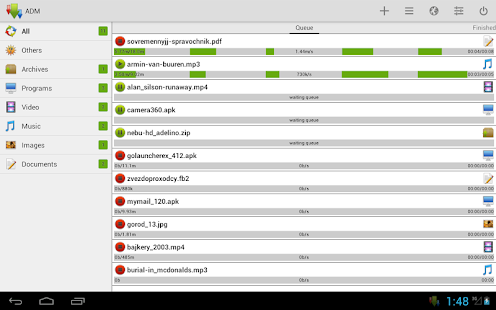
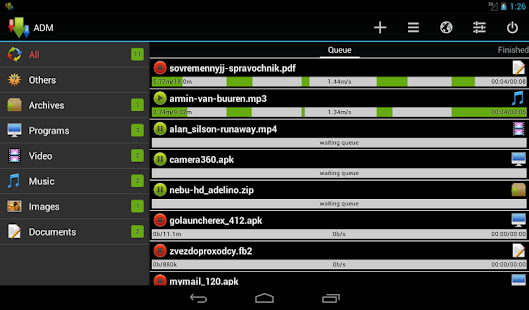
Advanced Download Manager Pro v5.0.2 Apk

Advanced Download Manager Pro v5.0.2 Apk | 2 MB |
Requires : Android 2.1 and up |
Download files simultaneously!
Advanced Download Manager Pro
What’s in this version :- Updated light theme (Settings – Interface)
- Left menu pushed over the toolbar.
- Displays selected sort and filter.
- If update does not work correctly – Clear data and cache.
App Review:
Features:
- download up to three files simultaneously;
- accelerated download by using multithreading (9 parts)
- interception of links from the browser and clipboard;
- icon of the program and downloading progress in the notification panel;
- backup list of downloads and settings on SD card;
- completion notification by sound and vibration;
- resume after reconnection or program restart;
- save different file types in different folders;
- built-in browser for sites with registration;
- plan files download on a schedule;
- widget on your home screen;
- site manager.
Add links from browser:
- press on link and from the window “Complete action using” select ADM (supported by Stock Browser, Dolphin, Boat Browser, Chrome)
- long press on a link to display the context menu, press “Share link” and from the window “Share via” select ADM (supported by Firefox, Skyfire, Stock Browser, Dolphin, Boat Browser)
- copy the link and the service will intercept the link (supported by Maxthon)
Controls:
- press on the download to start/stop the process;
- press on the completed download to open the file;
- long press on download to display the context menu.
YouTube is not supported under the rules of Google.
ProShot v2.1.0 Apk

ProShot v2.1.0 Apk | 2 MB |
Requires :Android 5.1 and up |
Requires :Android 5.1 and up |
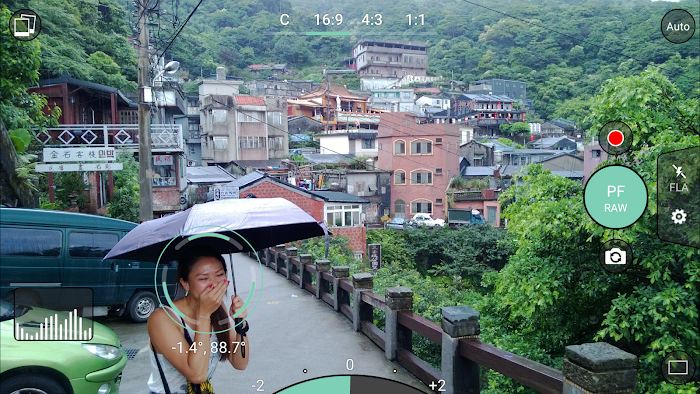
Leave the heavy DSLR at home, ProShot’s got your back!
ProShot
App Review:
What’s in this version :
- + Added option to select image resolution
- + Added shutter speed preview option (full manual mode only)
- + Improved UI performance
- + Improve image processing performance
- + Improved histogram efficiency
- + Fixed histogram on Galaxy S6
- + Fixed 4K and other video bugs
- + Fixed viewfinder flash on certain devices
- + Fixed issues when saving / deleting from SD card
CAMERA FEATURES:
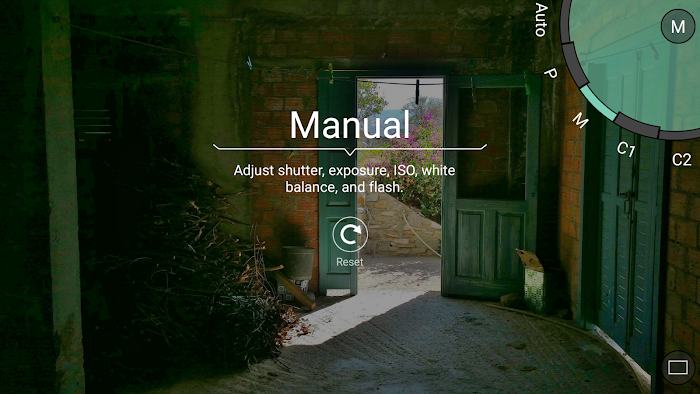
- Auto, Program, Manual, and two fully configurable Custom modes, just like a DSLR*
- Manual, semi-manual, or automatic control over exposure, flash, focus, ISO, shutter speed, torch, and white balance*
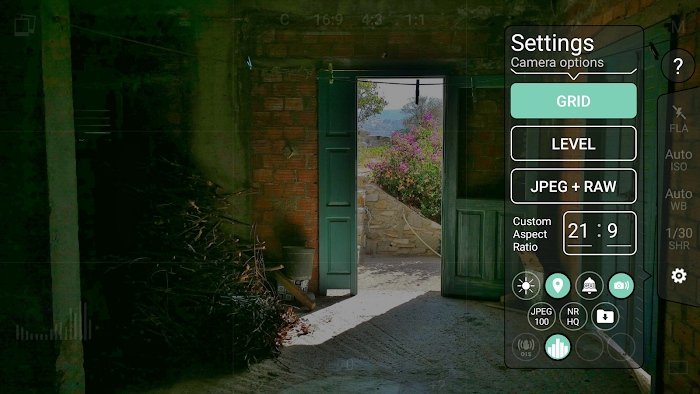
- Shoot in JPEG, RAW or RAW + JPEG* (RAW = .DNG file)
- Shoot full resolution in 16:9, 4:3, and 1:1
- Custom Aspect Ratio Mode: shoot in any aspect ratio you want, 21:9, 17:10, 50:3, it’s all possible!
- Full-res Burst, Timer, and Timelapse modes, all with full manual controls
- 4K video*
- Zero-lag bracket exposure up to ±3, in 1/3 stop increments*
- HDR, Night, and Action scene modes*
- Auto ISO option, turns Manual mode into Shutter Priority*
- Manual focus assist*
- Live histogram
- Front-facing camera with exposure control
- Zoom with just one finger
- Fully featured Camera Roll integrated into the viewfinder. View EXIF, support for video playback, media sharing, and delete
- Grid overlay
- Level with 3 different modes
- Adjust JPEG quality, Noise Reduction quality, photo location
- Shortcuts for GPS, screen brightness, camera shutter
- Most innovative camera UI ever created
VIDEO FEATURES:
- Manual, semi-manual, or automatic control*
- Record video in any mode (Auto, P, M, C1, or C2)
- Adjustable resolution, frame rate, and bitrate
- Industry-standard options for 180 degree rule
- Zoom and change any camera parameter, even during video recording
- Timelapse video, with full manual control
- Video light
Whistle Android Finder PRO v5.2 Apk

Whistle Android Finder PRO v5.2 Apk | 3 MB | R
equires Android:2.1 and up |
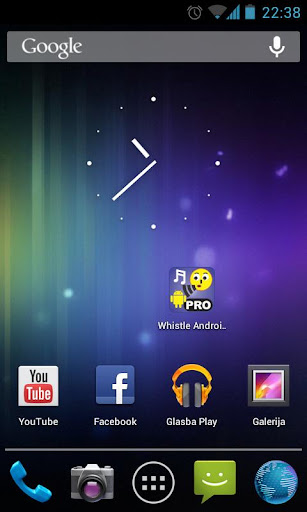
The Whistle Android Finder PRO is supreme
Android finder application which helps many people locate their Android
device with just a simple WHISTLE after losing it!!
Whistle Android Finder PRO
What’s in this version :- Bugfix Android 5.x
App Review:
Forgetting it somewhere or being hidden
somewhere in a room on a desk behind papers, in a briefcase or in a coat
pocket etc. The free version of this application named Whistle Android
Finder FREE (also available in Google Play) has reached more than
700,000 downloads till now and scored the average score of 4.1!
But now, after reading and taking into account more than 3,300 user comments, wishes, and suggestions, it is time to upgrade the application with new features, several important whistle engine improvements, a better user interface, new notification melodies, lower battery consumption and much more. This is the story about how Whistle Android Finder PRO was born!Here are the main features of the
But now, after reading and taking into account more than 3,300 user comments, wishes, and suggestions, it is time to upgrade the application with new features, several important whistle engine improvements, a better user interface, new notification melodies, lower battery consumption and much more. This is the story about how Whistle Android Finder PRO was born!Here are the main features of the
Whistle Android Finder PRO:
Remember, just whistle and your Android will respond!
Tags: phone finder, droid, tracker, whistling, find your phone, track your phone, find my phone, where is my phone, lost phone, lost droid, phone tracker, whistle, detector, whistle phone, whistle phone on android, whistler, Android finder, phone locator
- In contrast to the free, ad-supported version, the paid Whistle Android Finder PRO does not include any ads! Furthermore, the set of requested permissions is much lower now. Only the essential permissions are requested.
- Much lower battery consumption due to optimized whistle detection engine when compared to the Whistle Android Finder FREE. The application has been designed and strongly optimised in order to reduce battery drain as much as possible.
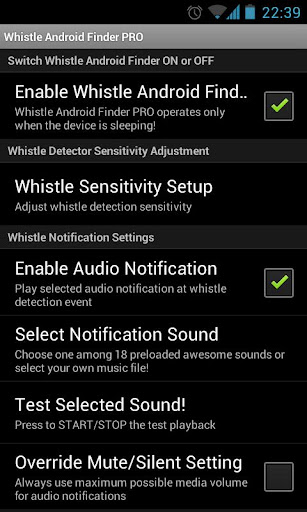
- Whistle Android Finder PRO can be enabled or disabled under the settings tab. Just run the application and the settings tab will appear! Remember: Whistle detection is working ONLY when the device is sleeping (i.e. when the screen is OFF).
- Once enabled, Whistle Android Finder PRO will work even if you reboot your Android device! Of course, you can disable it under the settings tab at any time.
- Whistle Android Finder PRO integrates the ability to release the microphone in your Android device during incoming or outgoing calls or when the screen of your device is ON! After a call ends, the normal background operation of whistle detection will resume automatically.
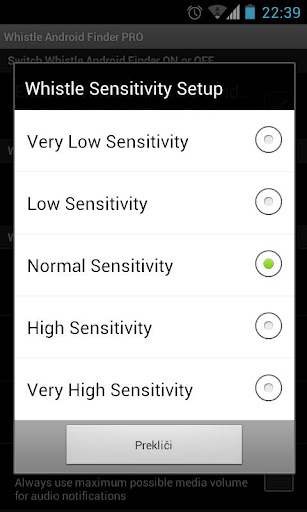
- It is possible to choose among 5 different whistle detection sensitivity levels! Whistle Android Finder PRO is just ready to adapt to any Android device regardless of the specifics of integrated acoustic components.
- Under the Whistle Android Finder PRO settings tab it is possible to choose among 17 different very amusing audio notification sounds to notify the presence of the detected whistle!
Remember, just whistle and your Android will respond!
Tags: phone finder, droid, tracker, whistling, find your phone, track your phone, find my phone, where is my phone, lost phone, lost droid, phone tracker, whistle, detector, whistle phone, whistle phone on android, whistler, Android finder, phone locator
Langganan:
Komentar (Atom)